

Overview
Each line is one API call in full: system prompt, tools, conversation, thinking, tool calls and results, token usage. Sessions run in real software projects or start from an empty directory. In stock: more than 90,000 Claude Opus 5 sessions and more than 50,000 Kimi K3 sessions. Other models are built to order.
What you get
<session-id>.jsonl # one line per API call
├── session_id     # same on every line
├── model          # e.g. kimi-k3
├── request        # full request body
│   ├── system     # system prompt
│   ├── tools      # 22–26 tool definitions
│   ├── messages   # conversation so far
│   ├── thinking, output_config, stream
│   └── max_tokens, context_management
├── response       # full model response
│   ├── content    # thinking, text, tool_use
│   ├── stop_reason
│   └── usage      # token counts
├── error          # failed calls only
└── flags # anomaly markers, if any- Full context on every line. Each request repeats the conversation so far, so files are large; tar.zst compresses them 80–247×.
- Every call kept. Retries, context compaction and side calls such as web search stay in the file.
- Thinking. Opus 5 thinking is summarized by the API and signed; Kimi K3 thinking is unsigned.
- Project languages. Counted by each project’s primary programming language, the projects cover 25 languages.
Samples
Five sessions, both models. The excerpts leave out some steps and the system reminders Claude Code adds to messages; … marks text left out, and the home directory is shown as ~. A turn is one user prompt and everything the agent does before it replies, usually several model calls and tool calls.
Sample 1 of 5
Shell script from an empty directory: fill the gaps, touch nothing else
The user wants every folder under /data/users to have four standard subfolders, without touching anything that already exists. The agent treats cache/tmp as a nested path and asks the user to confirm it, then builds a throwaway tree with four kinds of users and dry-runs before the real run. In turn 2 the user has the agent drop the chown it added unasked; in turn 3 they want no summary when nothing is missing, and the agent complies but keeps one warning for an empty root, saying why.
- User prompts
- 3
- API calls (lines in the file)
- 14
- Tool calls: Bash 6, Edit 3, Write 1, Read 1
- 11
- Thinking blocks (summarized, signed)
- 7
- Session file, uncompressed
- 1.5 MB
Excerpt: all 3 turns
- Thinking
I need to write a script ensuring each user directory has raw, processed, notebooks, and a cache/tmp structure — though I'm second-guessing whether "cache/tmp" means a nested tmp folder inside cache, or two separate top-level folders. … I also want newly created subdirectories to inherit ownership from their parent directory rather than defaulting to root, using
chown --reference=when running with elevated privileges — that seems like the careful approach. … - Tool call Write
file_path: ~/…/ensure_user_dirs.sh content: … # 已存在的目录不做任何改动(不动内容、不改权限)。 … # 需要保证存在的子目录。想改成 cache 和 tmp 平级,把 "cache/tmp" 换成 "cache" "tmp"。 SUBDIRS=(raw processed cache/tmp notebooks) … elif [[ -e $path || -L $path ]]; then # 同名的文件/坏软链挡在这儿,不能 mkdir,也不该删 —— 交给人处理。 blocked+=("$sub") … - Tool call Bash
… FIX=$(mktemp -d)/users … # bob: 只有 raw,另外有些自己的东西 mkdir -p "$FIX"/bob/raw "$FIX"/bob/my_stuff … # dave: notebooks 是个文件,挡路了 mkdir -p "$FIX"/dave/{raw,processed} touch "$FIX"/dave/notebooks … ~/…/ensure_user_dirs.sh -n "$FIX" … - Tool output Bash
…
ok   alice
bob
  + processed (dry-run)
  + cache/tmp (dry-run)
  + notebooks (dry-run)
…
dave
  ! notebooks 已存在但不是目录,跳过
  + cache/tmp (dry-run)
---
扫描 4 个用户,缺 8 个目录,1 个需要人工处理(dry-run,未改动)
9 more steps: turns 2–3
- Tool call Bash
…
grep -n -i "chown\|EUID" ensure_user_dirs.sh || echo "无 chown 残留"
…
- Tool output Bash
无 chown 残留
--- 语法检查:
OK
…
--- 再跑一遍:
ok   alice
ok   bob
ok   carol
---
扫描 3 个用户,新建 0 个目录,0 个失败
退出码: 0
- Thinking
The user wants the summary line skipped when nothing was missing—when created and failed are both zero, so I should suppress that output.…
There's also an edge case: an empty root directory with zero users would produce no output at all, which could look like the script silently failed. I'm considering adding a distinct warning line for that scenario since it likely signals a wrong path, though I want to flag it separately since it's slightly beyond the user's explicit request.…
- Tool call Edit
file_path: ~/…/ensure_user_dirs.sh old_string: … new_string: if ((users == 0)); then # 一个用户目录都没扫到,多半是根目录传错了,这个得说一声。 echo "$ROOT 下没有用户目录" >&2 elif ((created || failed)); then echo "---" … - Tool call Bash
…
- Tool output Bash
…
=== 全齐了(dave 先挪走):不打总结 ===
ok   alice
ok   bob
ok   carol
[退出码 0]

=== 全齐 + -q:完全静默 ===
[退出码 0]
…
=== 空根目录 ===
…下没有用户目录
[退出码 0]
Sample 2 of 5
A CSV script whose requirements keep changing
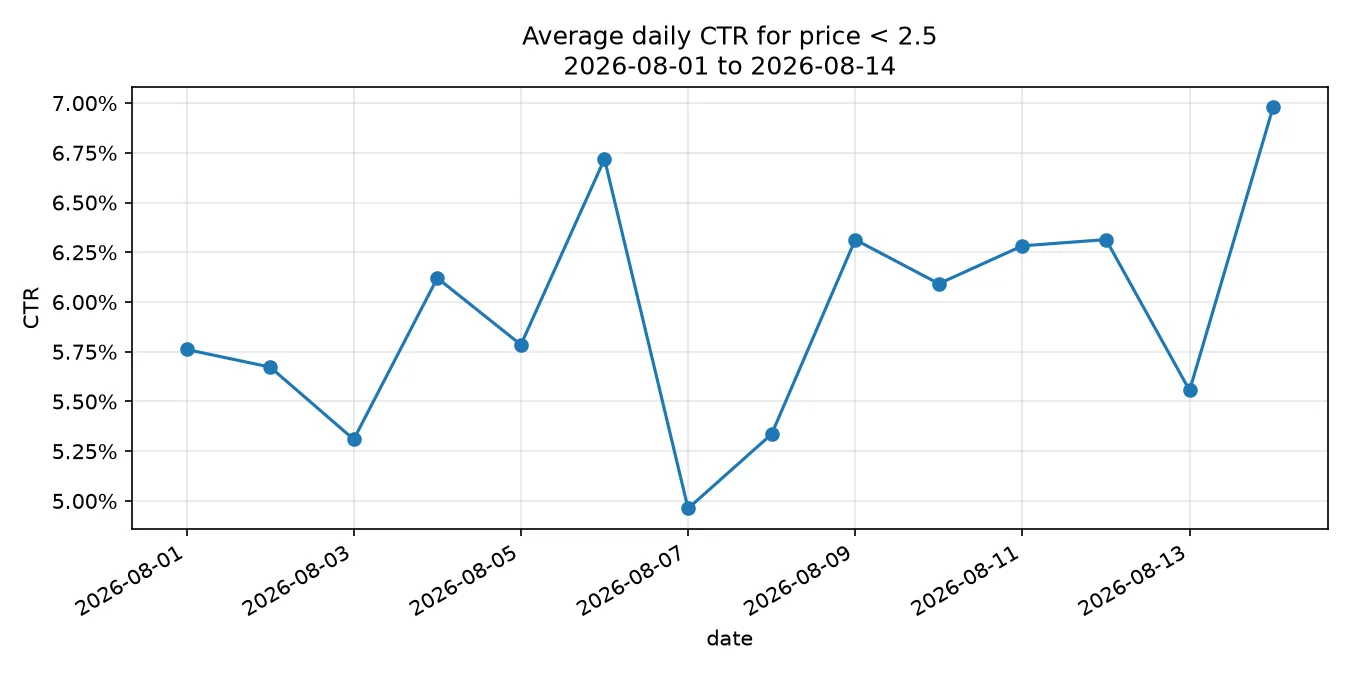
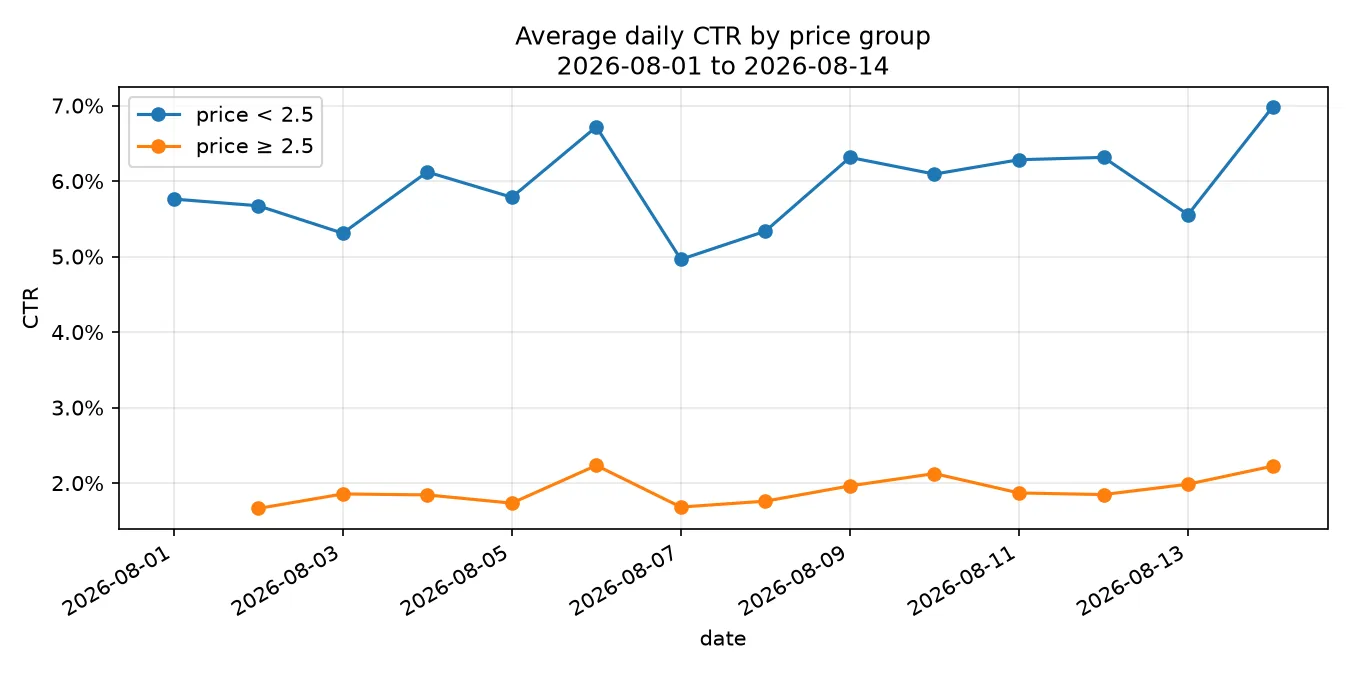
A throwaway script for the average click-through rate per day, over rows below a price threshold. In its thinking the agent settles a question the user did not raise (impression-weighted or per-row average) and tests on a tiny CSV whose answer can be checked by hand. In turns 2–4 the user asks for a chart, then for the comparison they had put on hold, then objects to columns they never asked for; turns 5 and 6 re-check the chart and switch CTR to percentages. The agent opens every chart it draws, and checks an empty cell against the raw rows before reporting it.
- User prompts
- 6
- API calls (lines in the file)
- 29
- Tool calls: Bash 11, Edit 8, Read 3, Write 1
- 23
- Thinking blocks (unsigned)
- 20
- Session file, uncompressed
- 7.8 MB
Charts the agent drew and opened to check
Turn 2
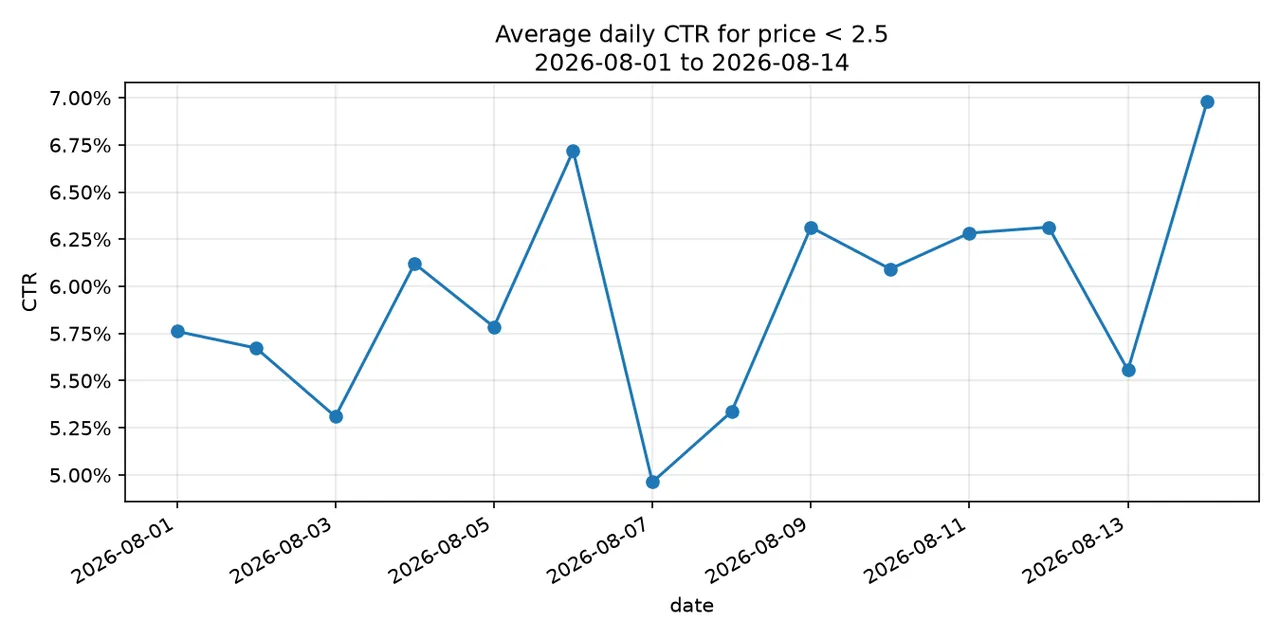
Chart drawn by --plot from 14 days of test data. The agent opened the PNG in the session and looked at it before replying.
Turn 3
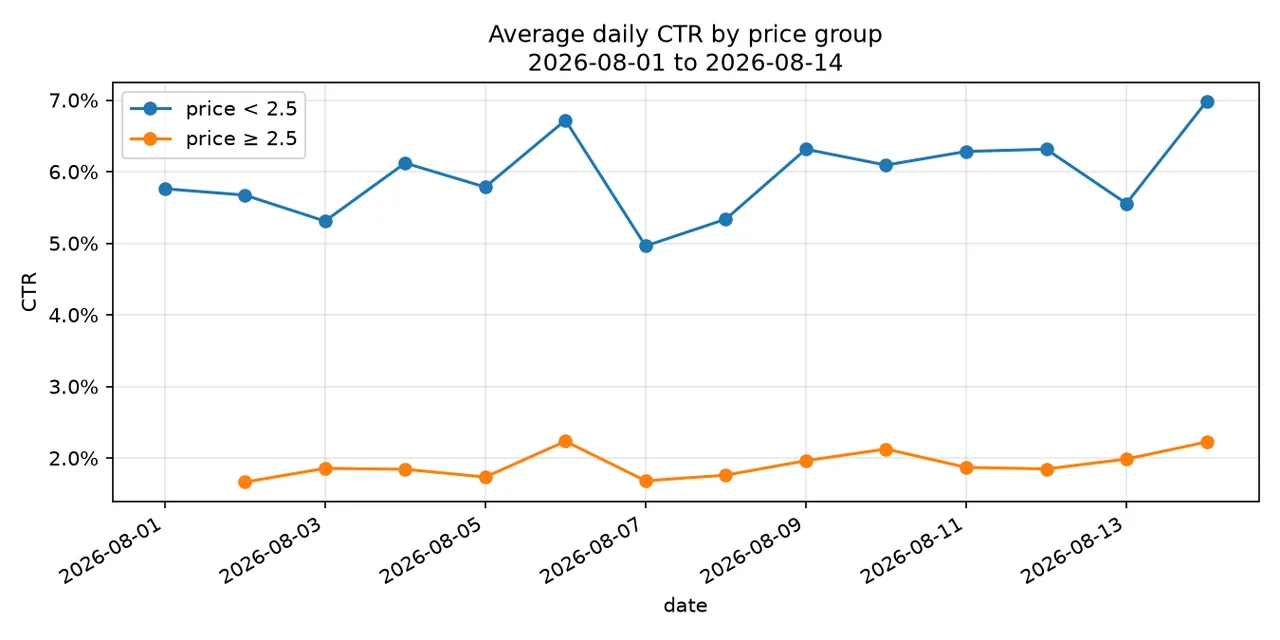
--compare draws both price groups on one chart. The orange line has no point on day 1: no row that day was priced at 2.50 or more, which the agent checked in the raw rows before saying so.
Excerpt: turns 1–4
- Thinking
… They mention their underlying goal: seeing whether cheaper listings get clicked more. There's a subtle statistical point here — "average CTR" could mean either:
- Mean of per-row CTRs (simple average of ratios)
- Weighted CTR (sum clicks / sum impressions per day)
…
- Tool call Write
file_path: ~/…/avg_ctr.py content: #!/usr/bin/env python3 """Average CTR by date for rows under a max price, within a date range. … CTR per day is sum(clicks) / sum(impressions) across the matching rows (i.e. impression-weighted, so big rows count more than tiny ones). … if float(row["price"]) >= args.max_price: continue clicks[d] += int(row["clicks"]) imps[d] += int(row["impressions"]) … - Tool call Bash
cat > …/test_imps.csv <<'EOF'
date,price,clicks,impressions
2026-08-01,1.00,10,200
2026-08-01,5.00,999,1000
2026-08-01,0.50,3,100
2026-08-02,2.00,20,400
2026-08-03,1.50,0,50
2026-07-30,1.00,50,500
EOF
python3 ~/…/avg_ctr.py …/test_imps.csv --max-price 2.50 --start 2026-08-01 --end 2026-08-02 && rm …/test_imps.csv
- Tool output Bash
date,ctr,clicks,impressions
2026-08-01,0.0433,13,300
2026-08-02,0.0500,20,400
10 more steps: turns 2–4
- Tool call Bash
…
- Tool output Bash
--- compare mode ---
date,ctr_under,ctr_over,clicks_under,imps_under,clicks_over,imps_over
2026-08-01,0.0576,,375,6509,0,0
2026-08-02,0.0567,0.0166,172,3032,57,3426
2026-08-03,0.0531,0.0186,242,4558,41,2209
…
- Tool call Bash
grep "^2026-08-01" …/test_imps.csv
- Tool output Bash
2026-08-01,2.11,20,358
2026-08-01,0.53,106,1731
2026-08-01,2.35,12,168
2026-08-01,1.48,13,226
2026-08-01,0.65,14,235
2026-08-01,0.59,56,1208
2026-08-01,1.53,84,1334
2026-08-01,0.61,70,1249
- Tool call Edit
file_path: ~/…/avg_ctr.py
old_string:
    if args.compare:
        print("date,ctr_under,ctr_over,clicks_under,imps_under,clicks_over,imps_over")
…
new_string:
    if args.compare:
        print("date,ctr_under,ctr_over")
        for d in days:
            print(",".join([str(d), fmt(ctr("under", d)), fmt(ctr("over", d))]))
Sample 3 of 5
Inherited React + Vite app: a claim challenged, then tested
The user inherited a React + Vite app and asks whether the dev server takes a port flag. The first check fails because dependencies were never installed; the agent installs them from the lockfile without changing it, then verifies. Asked whether “silently bumps to 5001” was a guess, it tests: the server it first puts on port 5000 listens on IPv4 while Vite listens on IPv6, so nothing collides; once it occupies the same IPv6 address, Vite moves to 5001 and says so, and the agent retracts “silently”. The session runs 19 turns; later ones bring a refactor, build checks and git questions.
- User prompts
- 19
- API calls (lines in the file)
- 74
- Tool calls: Bash 53, Read 8, Edit 4, Write 2, …
- 69
- Thinking blocks (summarized, signed)
- 48
- Session file, uncompressed
- 15 MB
Turn by turn (selected turns)
| Turn | The user asks → the agent | API calls / tool calls |
|---|---|---|
| 1 | Can the dev server take a port flag? → installs dependencies from the lockfile, then verifies | 7 / 7 |
| 2 | “are u guessing” → tests it, retracts “silently” | 15 / 14 |
| 3 | A stray untracked file → reads it, leaves it alone | 2 / 1 |
| 4 | How to set strictPort | 2 / 1 |
| 6 | Tidy up without renaming imports → extracts a hook, removes a dead file and 4 unused imports, build passes | 14 / 20 |
| 8 | Paste the raw dev, build and test output → catches its own wrong exit-code capture | 5 / 5 |
| 9 | List every changed file | 2 / 2 |
| 14 | Make 5000 the default port | 4 / 3 |
| 15 | The stray file from turn 3 is still there | 1 / 0 |
| 16 | Delete it | 2 / 1 |
| 17 | The user mixes up two hooks → the agent points out they are unrelated | 1 / 0 |
| 19 | Is the port change committed? → no | 2 / 1 |
Excerpt: turns 1–2
- Tool call Bash
timeout 20 npx vite --port 5000 2>&1 | head -20
- Tool output Bash
npm warn exec The following package was not found and will be installed: vite@8.2.2
vite.config.js (1:297) [UNRESOLVED_IMPORT] Could not resolve 'vite' in vite.config.js
…
failed to load config from ~/…/vite.config.js
error when starting dev server:
Error [ERR_MODULE_NOT_FOUND]: Cannot find package 'vite' imported from ~/…/vite.config.js.timestamp-…
- Tool call Bash
…
- Tool output Bash
--- output ---

> …@0.0.0 dev
> vite --port 5000


  VITE v4.0.4  ready in 232 ms

  ➜  Local:   http://localhost:5000/
  ➜  Network: use --host to expose
8 more steps: turn 2
- Tool call Bash
sleep 4; echo "=== vite log ==="; cat /tmp/vite_bg.log; …(ss -ltnp 2>/dev/null || netstat -ltnp 2>/dev/null) | grep -E '500[0-9]'; echo; echo "=== who answers :5000 ==="; curl -s -m 5 http://127.0.0.1:5000/ | head -8
- Tool output Bash
…
=== listeners on 500x ===
tcp        0      0 0.0.0.0:5000            0.0.0.0:*               LISTEN      783/python3
tcp6       0      0 ::1:5000                :::*                    LISTEN      971/node

=== who answers :5000 ===
<!DOCTYPE HTML>
…
<title>Directory listing for /</title>
…
- Thinking
…python3 grabs IPv4 0.0.0.0:5000 while vite binds IPv6 ::1:5000, so they don't collide and no port bump occurs. That means curl to 127.0.0.1:5000 hits python, not vite, so both servers silently coexist and which one you reach depends on the resolution path — actually worse than a simple bump.

But this doesn't disprove auto-increment in general, it just means my test didn't produce a real collision. To force a true test I need to occupy ::1:5000 specifically…
- Tool call Bash
timeout 25 npm run dev -- --port 5000 > /tmp/vite_collide.log 2>&1; echo "=== vite output (::1:5000 occupied) ==="; cat /tmp/vite_collide.log
- Tool output Bash
=== vite output (::1:5000 occupied) ===

> …@0.0.0 dev
> vite --port 5000

Port 5000 is in use, trying another one...

  VITE v4.0.4  ready in 342 ms

  ➜  Local:   http://localhost:5001/
  ➜  Network: use --host to expose
Sample 4 of 5
Beam search in a small PyTorch library: “you actually sure?”
Eight turns on a small sequence-generation library: porting a copied generate() call, tracing a wrong end-of-sequence id, changing a default. In turn 6 the agent says a run that never emits end-of-sequence is cut silently at 49 tokens; in turn 7 the user asks whether that number was simply asserted. With no torch installed, the agent imports the library’s real beam-search file with only the tensor math stubbed, and prints the lengths. In turn 8 a second check of the same kind shows that one of its own earlier claims was wrong, and its reply opens with that correction.
- User prompts
- 8
- API calls (lines in the file)
- 32
- Tool calls: Bash 17, Read 5, Write 3, Edit 1, …
- 27
- Thinking blocks (unsigned)
- 24
- Session file, uncompressed
- 5.8 MB
Turn by turn (selected turns)
| Turn | The user asks → the agent | API calls / tool calls |
|---|---|---|
| 1 | Rework a copied generate() call for this library’s beam search |
5 / 5 |
| 2 | Output always runs to max length: length penalty or wrong end-of-sequence id? | 1 / 0 |
| 3 | The end-of-sequence id was the cause: keep that fix, revert the start token | 2 / 1 |
| 4 | Lower the max_length default to 48 → the real default is 1024, and the call site overrides it |
3 / 2 |
| 6 | No end-of-sequence within 48 steps: chop or raise? → silent chop, 49 tokens | 1 / 0 |
| 7 | “you actually sure?” → runs the real loop with stubbed tensors | 13 / 14 |
| 8 | Is any of this sound? → a new check disproves one of its own claims | 3 / 2 |
Excerpt: end of turn 6 to turn 8
- Thinking
The user is calling me out — good. They want me to actually verify the 49-token claim rather than assert it. Let me trace through the code carefully, and better yet, actually run it to verify.
…
- Tool call Bash
cd /tmp && (command -v python3 && python3 check_len.py) || ls /usr/bin/python* /usr/local/bin/python* 2>/dev/null
- Tool output Bash
Exit code 2 /usr/bin/python3 Traceback (most recent call last): File "/tmp/check_len.py", line 1, in <module> import torch ModuleNotFoundError: No module named 'torch' … - Tool call Write
file_path: /tmp/check_len_stub.py
content:
"""Runs the REAL beam_search.py control flow with torch numerics stubbed out.

The actual loop, token appends, break condition and final max() selection in
…/beam_search.py execute verbatim — only tensor math
is faked, which is irrelevant to how many tokens get appended.
"""
…
class CountingGen(…):
    def …(self, logits, …):
        # argmax is always token 3 — never EOS, so the loop can never exit early
…
8 more steps: rest of turn 7 and turn 8
- Tool call Bash
PYTHONPATH=~/… python3 /tmp/check_len_stub.py
- Tool output Bash
enc-dec, max_length=48, no EOS: [49, 49] | last token: 3
enc-dec, max_length=5,  no EOS: [6, 6]
dec-only, max_length=48, prompt len 3: [48, 48]
- Tool call Bash
PYTHONPATH=~/… python3 /tmp/check_eos_stub.py
- Tool output Bash
terminated at length: [6, 6]
sequence: [0, 3, 3, 3, 3, 9]
ends with duplicated EOS: False
Sample 5 of 5
Legacy data mapping in a Vue/Nuxt app: proof demanded
The user asks how the “legacy import” maps old JSON into the current store. The agent first corrects the premise: that file samples images; the mapping lives in another file, where ?? keeps a junk new value such as 0 instead of falling back to the legacy field, so the default 48 wins. Asked to log this and an unchecked out-of-bounds case with line numbers, then to prove the fix, it records both as tasks with exact lines, changes two lines and, since the project has no test framework, runs old and new logic side by side in a throwaway script (with node, as bun is missing). A one-line follow-up about negative values turns up a second case of the same bug.
- User prompts
- 7
- API calls (lines in the file)
- 34
- Tool calls: Bash 14, Read 6, Write 5, Edit 3, …
- 34
- Thinking blocks (summarized, signed)
- 21
- Session file, uncompressed
- 7.5 MB
Turn by turn (selected turns)
| Turn | The user asks → the agent | API calls / tool calls |
|---|---|---|
| 1 | How does the legacy import map old JSON? → the user named the wrong file; explains the real mapping and a ?? fallback bug |
6 / 9 |
| 2 | Log this bug and an unchecked out-of-bounds case, with line numbers → two tasks | 2 / 2 |
| 3 | Fix the first one, show the lines, prove it → two-line fix, old-vs-new script, node instead of the missing bun | 10 / 10 |
| 4 | What if cellW is negative? → it is clamped to the minimum of 8, so square cells become rectangular | 3 / 2 |
| 5 | Go ahead with the fix → cell, cellW and cellH count as valid only when > 0; 25 cases, 13 behavior changes listed | 5 / 4 |
Excerpt: turns 1–4
- Tool call TaskCreate
subject: … 不校验坐标越界,缩图后残留幽灵格子
description:
位置:…/tilemap.ts:41-50(…),校验在第 46 行
…
后果不对称:
- 绘制侧不做边界过滤 —— …(tilemap.ts:235-253) 第 249-252 行遍历全部 entries 直接调…,越界格子照样 drawImage 到画布区域外
- 命中侧做边界过滤 —— …(tilemap.ts:176-189) 第 187 行 `…` 返回 null
=> 画得出来但点不中,也删不掉,等于幽灵数据;…
- Tool call Edit
file_path: …/tilemap.ts
old_string:
…
  const cellW = …(t.cellW ?? legacy, …)
  const cellH = …(t.cellH ?? legacy, …)
new_string:
…
  const cellW = …(Number(t.cellW) || legacy, …)
  const cellH = …(Number(t.cellH) || legacy, …)
8 more steps: rest of turn 3 and turn 4
- Tool call Write
file_path: /tmp/verify-cellw.ts content: import {…} from '…/tilemap' … // replica of the pre-fix lines 116-118, to show what changed function oldCellW(t: any) { … } … - Tool call Bash
bun /tmp/verify-cellw.ts
- Tool output Bash
Exit code 127
/bin/bash: line 1: bun: command not found
- Tool call Bash
node --experimental-strip-types /tmp/verify-cellw.ts 2>&1 | grep -v ExperimentalWarning…
- Tool output Bash
case                          | in                          | old | new | want |
------------------------------|-----------------------------|-----|-----|------|--
旧格式 only                      | {"cell":32}                 |  32 |  32 |   32 | ok
旧 cell + cellW=0              | {"cell":32,"cellW":0,"cellH":0} |  48 |  32 |   32 | ok  <-- 修复点
旧 cell + cellW="abc"          | {"cell":32,"cellW":"abc"}   |  48 |  32 |   32 | ok  <-- 修复点
…
全部 17 个用例通过
Customization
Including, but not limited to, the following; anything else is open for discussion.
- Agent: any model on a Messages-compatible API, and its effort.
- Harness: Claude Code version, or another agent harness.
- Workspace: language mix, empty-directory share, CLAUDE.md, skills, uncommitted changes.
- Conversation: number of user prompts, task types, English or Chinese.
- Output: raw lines, lines labeled by turn and role, or stitched conversations.
- Volume and schedule: number of sessions, the mix of models and languages, and delivery dates.